
Name-Based Case Searches
Davie County cases now live in the North Carolina eCourts Portal, the public statewide system, after the county entered eCourts on October 13, 2025. Smart Search requires a basic Record Number or Name to start. Name searches use the Last, First order. Advanced Filtering only supplements that basic search. It does not replace it. So run a broad Davie County case search first, then tighten it if a common name floods you with results by adding Davie in Location, a case type, a status, or a filing-date range.
- Open the North Carolina eCourts Portal and select Smart Search.
- Enter the record number, or enter the last name and first name in the basic search.
- Use Location for Davie and add case type, status, or filing date only to narrow the matches.
- Open the matching Case Summary and compare its parties, type, events, and hearings before treating it as the intended case.
| Field label | Type | Required | Davie search note |
|---|---|---|---|
| Record Number or Name | Basic text search | Yes | Use a case number, or Last, First for a person. |
| Location | Filter | No | Select Davie to focus the statewide system. |
| Party and date filters | Advanced filters | No | Public date of birth masks month and day as XX/XX. |
| Case type and status | Advanced filters | No | Use only after the basic query is present. |
Davie Case Search After eCourts
Davie now runs on the same Portal system used across North Carolina. The official Portal training and resources confirm that anyone can search and view eligible public material. No registration is needed. Registering helps only with saving My Cases. It cannot unseal a confidential case. The Portal is a viewing tool, plain and simple. It never turns a public user into the clerk of court.
One quirk of conversion: older Davie files may still carry legacy case-type labels like CVD, CVM, CVS, T, M, R, or E. Historical events can also show a midnight timestamp left over from conversion. Read those labels and times as system context, nothing more. They do not signal a new filing, a real hearing time, or some separate courthouse procedure in the Davie County court docket.
Case Number Searches
A current Enterprise Justice number has a two-digit year, letters, a six-digit sequence, and a hyphenated three-digit county identifier. The Portal guide shows 21CR000007-910 as a generic format example. It is not a Davie case. A case number beats a name for exactness. It preserves the year, type code, sequence, and county segment of the record. Paste it carefully. Keep the hyphen.
Portal also accepts a case-number wildcard, which needs at least four characters before an asterisk. That trick works only when the prefix you know is solid. An older converted file may still use the legacy labels above. A failed current-format search does not mean the record never existed. The number may be incomplete. Check it against a notice. Or ask the Davie Clerk for help with the docket lookup.
Davie Location and Case Filters
Smart Search can narrow a basic query. Filters cover search type, Location, party information, date of birth, case type, case status, and filing date. Search types include case number, business name, and citation number. Case-type filters for the public cover all public cases. They also cover civil, family, and probate; bond forfeiture; civil actions; criminal and infraction; estates; and named civil categories. Never treat a category as a conclusion. It applies only to a case that has been opened and verified.
Date of birth works as a filter. The public view masks the month and day. With a common name, filing-date filtering is often the smarter first cut. Pick Davie in Location. That separates the county's state-court records from results elsewhere in the statewide system. For any question about a particular result in the Davie County court docket, the Clerk of Superior Court remains the local source.
Case Search Results Explained
A Smart Search result opens a Case Summary, also called the Register of Actions. What appears depends on the public case and the fields actually present. The guide supports careful reading of basic and assignment data, public parties excluding victims, applicable causes of action, chronological case events, disposition, hearings, financial information, and public documents. What it does not support is inventing a field. Some other court docket may display one. That does not transfer.
| Basic and assignment | Core case information and assigned information where present. |
|---|---|
| Parties | Public party information; victim information is excluded from public search results. |
| Case events | A chronological Register of Actions view of events that are available publicly. |
| Disposition and hearings | Outcome or scheduled-hearing information when present in the case. |
| Financial and documents | Current financial information and public documents where access permits. |
Portal’s Advanced User Guide distinguishes those public views from an official court record.
Davie Portal Result Limits
Smart Search caps a Davie County docket query at 200 results. That ceiling is a prompt to tighten the search. It is not evidence the case sits outside the system. Add Davie under Location. Try a filing-date range or a supported case type. Refine the party name as well. Each filter should rest on facts already known about the case.
Advanced name searching changes how results behave. It can shrink a result set and switch off wildcard behavior. Business-name wildcards carry their own limits. For a person, the wildcard format requires at least three last-name characters plus an asterisk. One first-name character plus an asterisk is also required. Treat wildcards as a way to complete a partial name. Never use them as a way around public-access limits.
Match the search type to what you hold. Smart Search lists case number, business name, and citation number as choices. A business search requires choosing Business Name in Advanced Filtering, and its wildcard search fails if the first three characters include a number, space, or special character. A citation search can flag an eligible Davie infraction case. The result still needs checks for location, party or case identifiers, and public availability. Portal returns no more than 200 results. Improve known criteria rather than repeat a broad query. A party-name search does not read the text of charges or filings. The Portal FAQ says charge-based searching is not available. That is one more reason to use a case number or the clerk. A name query can be too narrow for the question.
A no-results display can reflect criteria, timing, conversion, or a restricted case type. It is not a conclusion about the case itself.
Two Ways to Search: County and State
Davie County keeps no separate public case-search database. Portal is the statewide layer. You select Davie inside it through Location and case details, so the county route is a Davie-filtered Portal search followed, if necessary, by the clerk at the courthouse. A separate state tool, NC Judgment Search, indexes judgments only rather than the full court record.
| Davie-filtered Smart Search | NC Judgment Search |
|---|---|
| Finds eligible public case information and Case Summaries in Portal. | Indexes judgments by name or case number. |
| Can use Location, type, status, and filing-date filters. | Can filter by type, status, location, and date. |
| Shows current financial information when a case has it. | Shows index date and time and original judgment amounts. |
| Best for a Davie case lookup. | Not a substitute for the full case record. |
Found the case already? For a filed document or a certified copy, use Court Case Records and contact the Davie clerk.
Davie Portal Viewing and Filing
Portal does one job. It lets the public view eligible court records in Davie County. Filing is handled elsewhere, by North Carolina eCourts File & Serve. That is a separate application built for submitting documents. That split trips up plenty of first-time users, so keep it straight. Opening a case record in Portal does not file anything. It does not start a case or move a hearing date.
The File & Serve interface is where filings actually go. Its landing page shows the services available to attorneys and self-represented filers.
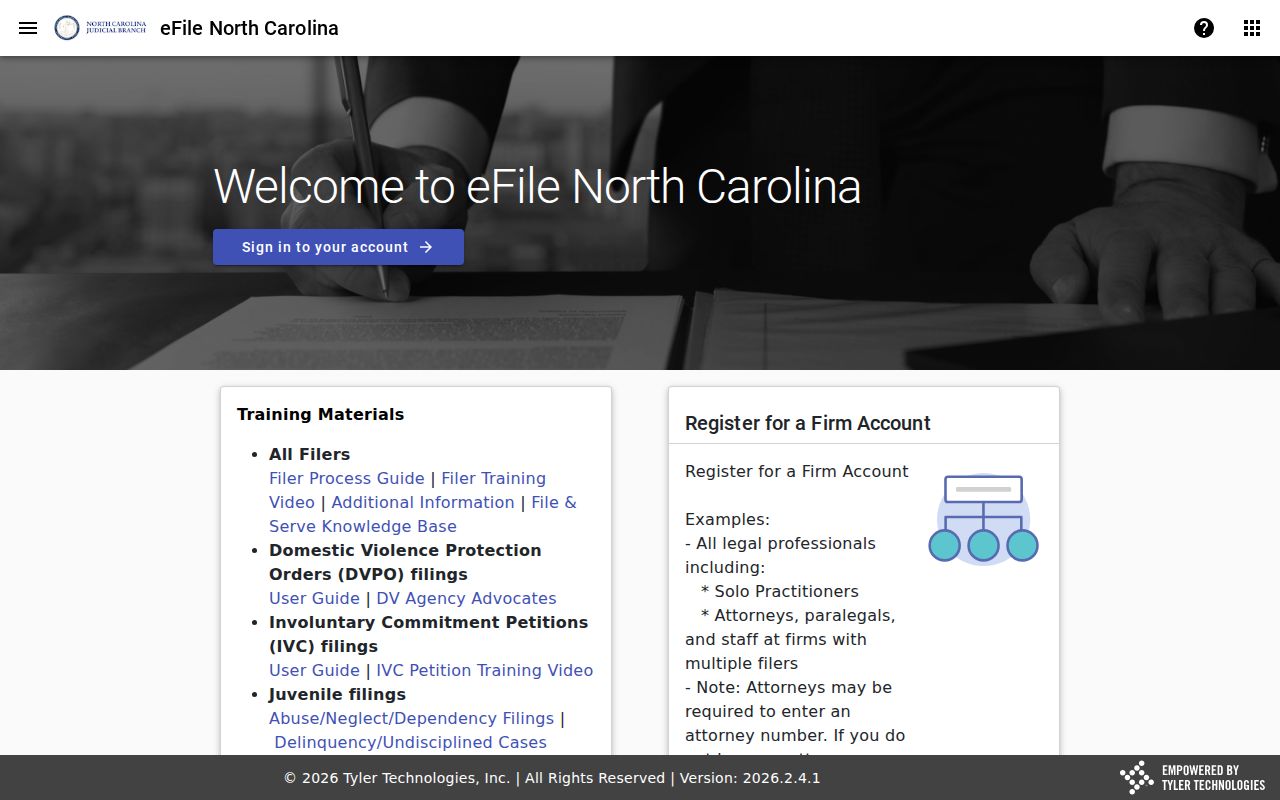
Public case lookup and electronic filing are separate steps in the Davie court system. Keeping that distinction clear matters.
Which Cases Stay Restricted
Public Portal access leaves out sealed or confidential cases, data, and documents. Juvenile records, unreturned warrants, protective-order and domestic-violence internet limitations, and some confidential special proceedings carry additional restrictions. A public search never displays victim names. It also masks parts of date-of-birth information. No wildcard or registration can solve a restricted result. When a case is older, unclear, or unavailable, contact the Davie Clerk of Superior Court at (336) 936-3000. The criminal line is (336) 936-3002. The civil line is (336) 936-3003, and the estates line is (336) 936-3004. The Davie contact directory identifies those local channels. Ask about the correct lawful access route instead of inferring a restricted record's status.
Davie Clerk Case Search Fallback
A Davie County search can still come up empty. End with a careful clerk inquiry, not a conclusion about the case. Before calling, have the case number ready. Also have the exact party name, case type, and the reason the record is unclear. The clerk can explain the proper channel for an older converted file, a record that needs an official copy, or a public-access question Portal cannot answer.
The courthouse is at 140 S Main Street in Mocksville. Public hours are Monday through Friday, 8:30 a.m. to 5:00 p.m. Portal remains useful for public viewing. The Davie Clerk remains the local source for case-specific assistance and official records.